Design system

Every page built from your own parts.

Caelo does not let the AI paint each page from scratch. It builds from a design system you own: one theme, one layout, page types and modules. That keeps the site consistent today and easy to change next year.

The parts

Four layers, each with one job.

Every page is assembled from these layers. The AI works inside them, so its work fits what is already there.

Theme

One theme for colours, type and spacing

Colours, fonts, spacing, corners and shadows are tokens, each with a note on what it is for and where it must not be used. Change a token and every page follows.

    Layout

    Header and footer, once

    The layout carries the header, the footer and the navigation for the whole site. A new menu item appears on every page at the same moment.

      Templates

      Page types with a fixed shape

      A blog article, a product page, a docs page: each page type has its template, so every page of that type has the same structure.

        Modules

        Sections with named fields

        Every section is a module with fields such as headline, text or button link. Editors change the content without touching the structure. A button is the same button on page one and page fifty.

          Consistency

          Why page fifty still looks like page one.

          A design system only helps if it is used. These rules make the AI use it, and they apply to every change, not only the first build.

          Reuse firstThe AI looks for a module that already fits before it makes a new one.
          Shared contentText that belongs on several pages, such as a contact block, is stored once. Edit it and every page shows the change.
          Lists stay listsA menu with ten items is one list, not ten fields. Adding the eleventh needs no new section.
          No loose HTMLPages only reference modules. There is no place for a one-off snippet that drifts away from the design.
          Options firstAsk for a redesign and the AI shows variants in your real theme before it changes anything.

          Quality

          Checked before it goes live.

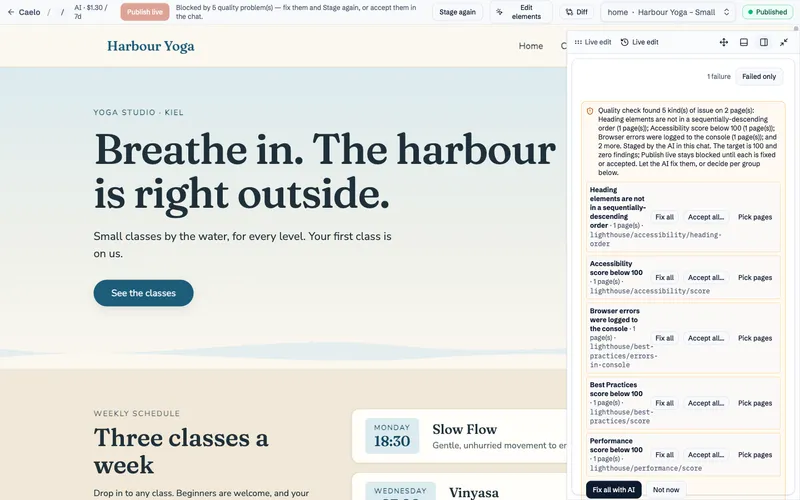
          Before a change can go live, Caelo checks the staged build, exactly what visitors would get. Problems block Publish live until they are fixed or a person accepts them.

          LighthouseEvery Stage that changes how pages look is checked for performance, accessibility, best practices and SEO, with 100 as the target.
          Meta descriptionsA published page without one cannot be staged.
          Broken sectionsIf a section cannot be rendered, the Stage stops instead of shipping an empty block.
          DecisionsWhat truly cannot be fixed comes to you as one decision, with the reason. A 99 is not called good enough.

          See it

          A new course page from parts the site already has

          The studio needs a page for a new back-care course. The editor describes it; the AI assembles it from the site's own sections, so it matches without a designer.
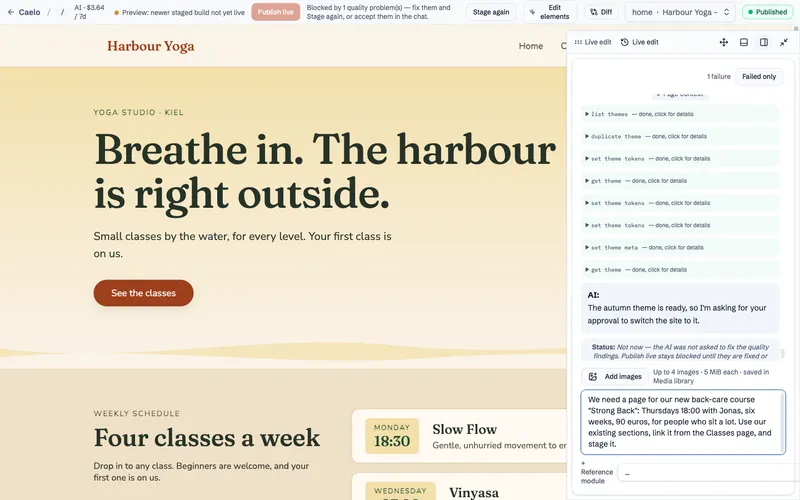
          1. The editor asks for a new page for a six-week back-care course with day, time, teacher and price.
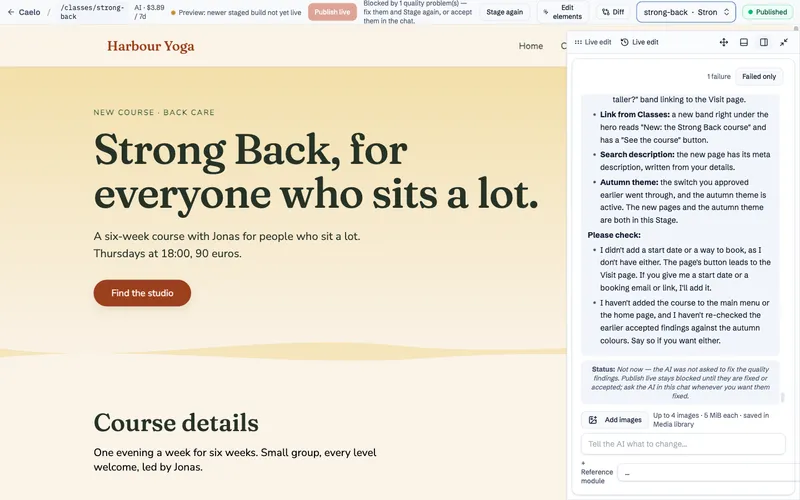
          2. The new Strong Back course page, built from the site's existing sections, next to the AI's summary of what it added and what it still needs.
          3. The quality check of the staged site lists its findings by type, each with Fix all, Accept or Pick pages, and one button to fix everything with AI.
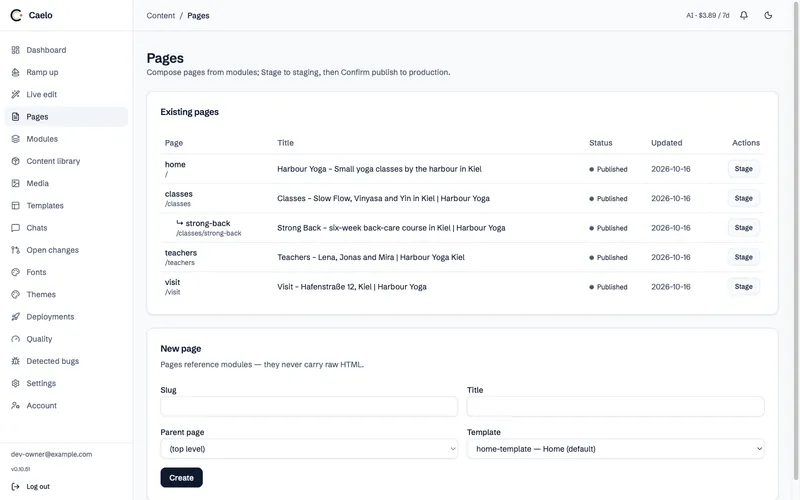
          4. The Pages list in the Caelo admin, with the new course page nested under Classes.

          Screenshots from Caelo 0.10.52 on the Harbour Yoga demo site, October 2026.

          Features

          The rest comes as plugins.

          Languages, cookie consent, forms, newsletter, comments, ratings and visitor login are built once and maintained with Caelo.