In Caelo
Caelo's assistant
Chat in the admin or click an element on your live page. Caelo calls the model with your own API key, and every call lands in the cost dashboard. This is how your team edits day to day.
AI and agents
Caelo works with the AI you choose. Use its assistant with your own key, or connect your own agent and keep the thinking on the plan you already pay for.
Three ways
All three work on the same site with the same tools and the same rules. They differ in who runs the model and who pays for it.
In Caelo
Chat in the admin or click an element on your live page. Caelo calls the model with your own API key, and every call lands in the cost dashboard. This is how your team edits day to day.
From your client
Talk to Caelo's assistant from Claude Code, Claude Desktop or another MCP client that runs local servers, with nothing but a token. Do research and drafting in your own tool, and let Caelo build the page in your design. ChatGPT and web connectors are not supported yet.
For builds and migrations
Connect Claude Code or a comparable agent. It gets the tools Caelo's assistant uses, and the thinking runs on your Claude subscription or another plan you already pay for. Caelo makes no AI calls of its own on that connection; tasks like translations come back to your agent. We build and maintain caelo-cms.com this way.
$ claude mcp add caelo-admin \
  --env CAELO_ADMIN_URL=https://admin.example.com \
  --env CAELO_MCP_TOKEN=mcp_… \
  -- bunx --package @caelo-cms/mcp-server@latest caelo-admin-mcp
# copy the exact command from Settings, MCP in your admin; the server switches to your install's version on its own
Caelo on Caelo
caelo-cms.com runs on Caelo. Most of it was built from Claude Code over the Power-MCP. The agent drafts and stages; going live stays a person's click.
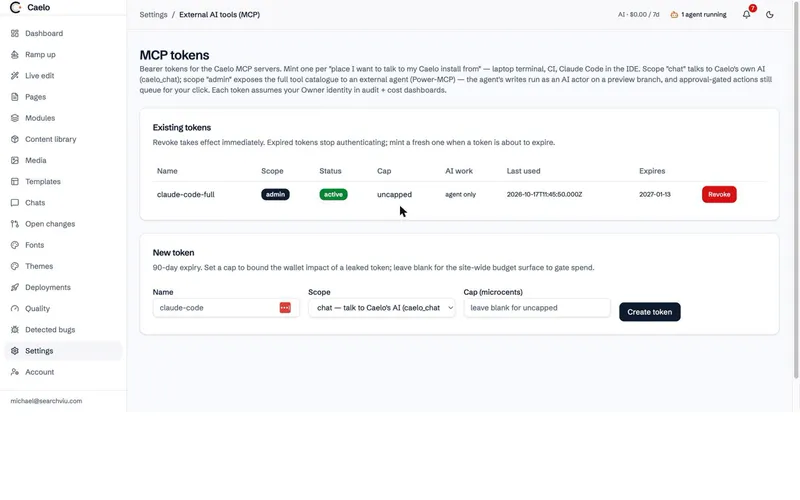
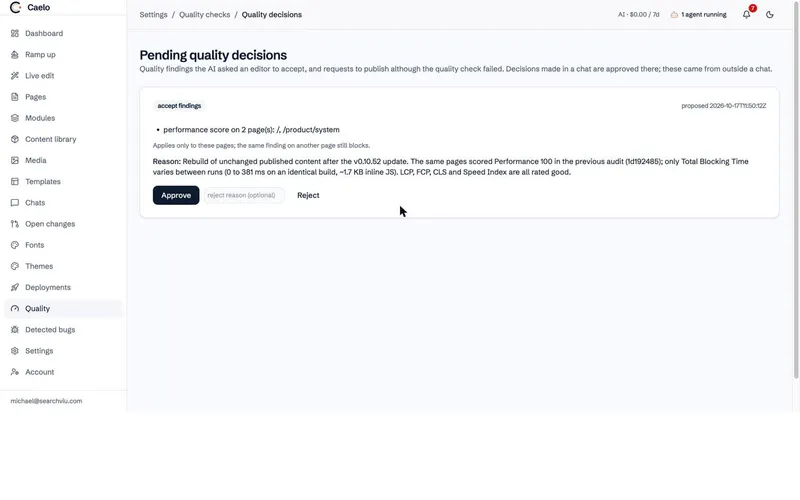
Screenshots from the admin of this website, October 2026.
Transcript
This is the agent's side of the session that added the product tour to this website, shortened to the tool calls. The request came from a person in Claude Code; every line below is a call to Caelo over the Power-MCP.
> Put the product tour on the product pages, with the
  screenshots from the demo site.

● caelo_open_session        resumed "Website-Redesign"
● caelo_get_context         site model, playbook, skills index
● find_media "tour-"        19 screenshots with alt text
● add_module                new modules: Product tour, Tour step
● create_content_instances  19 steps in one transaction
● add_module                tours on /product/control, /product/system,
                            /migrate and /ai
● screenshot_page           desktop and phone, checked
● stage_changes             staging rebuilt, quality check running
◐ Publish live              waiting for a person
The thinking ran in Claude Code, on a subscription we already pay for. Caelo made no AI calls of its own for this work; the cost dashboard in the admin showed $0.00 for the week.
Providers
You choose a provider and a model when you set Caelo up, and can change both later. Every provider sits behind the same layer, so switching does not change how your site is built.
Same rules
Your own agent is not a back door. It works under the permissions of the token you give it and stops at the same gates as Caelo's assistant.
Costs
Caelo itself is free and makes no money on your AI usage. When your team uses Caelo's own AI, in the chat or in live edit, each call runs on your own API key. You pay your provider directly, every amount shows in the cost dashboard, and budgets cap it. For scale: our automated real-AI test builds a small branded site and edits it across 14 scenarios with Claude Sonnet, and a run typically costs a few dollars. Building a large site from scratch or moving one with many pages takes far more tokens. For that we recommend the Power-MCP with Claude Code or a comparable agent, on a subscription you already pay for. The thinking runs there, and Caelo makes no AI calls of its own. Your team then edits day to day in the admin.
Start
Create a token, run one command, and your agent can work on your site.